
What is Lasova?
The Team
Role
Product Designer
Type
Volunteering Management System
Timeline
The Challenge
The work at Lasova was disorganized. As a result of the lack of organization, there were issues with
Waste of time
By using multiple platforms we are limited with our actions and depend on number of platforms
Manual actions
Using actual papers in order to do tasks instead of digitally do it
Volunteers help too
We designed a mobile version for the volunteers so they can enter their volunteering time instead of the managers
The Projects Goal
Design and develop a volunteer management system for Lasova, taking into consideration the needs of the organization and the needs of the volunteers on a daily basis.
1
Save time
Gather all the information into one place including register site that automatically connects
2
Efficient ecosystem
One platform for all the tasks an organization needed
3
Easier interface
Easy to integrate daily tasks that work the same way they used to work
User interview
Our task was to revitalize a dormant project by creating a well-planned and designed project with a design system and implementing it. We achieved this by gathering the requirements from the volunteer relations manager and working closely with the director to develop the necessary screens.

design process
In order to understand their problem and our actions to get to the solution we used the design thinking method
Empathize
We surveyed the people in charge of managing the non-profit organization, tried to identify their pain points, and figure out which actions are most important to them and which roles require the most use in the system.
Define
Understand that their system wasn't meeting all their needs, so they were wasting a lot of time on communication between volunteers and managers of volunteer, and a lack of organization in their Excel files.
Ideate
We had a few ideas that we thought about. After narrowing down the options to the specific solution, we created a simple and intuitive interface, the ability to work with automatic options, and tracking of volunteer status.
We created a user-friendly interface to improve the customer experience and streamline complicated processes.
We set up automatic sync with the charity's website for direct lead entry into the system.
We added volunteer tracking so we can quickly and efficiently track the number of volunteers.
Prototype
We created a basic MVP for use by the charity's managers to test the system's accuracy and gather initial data.
Test
Collecting information, reducing clutter, and gathering conclusions about the use of existing widgets, button placement, and other components to create a more specific and improved version for the customer.
final result
We streamlined the process of matching volunteers and tracking progress with a user-friendly interface and automatic website sync. This improved efficiency and satisfaction for all involved.
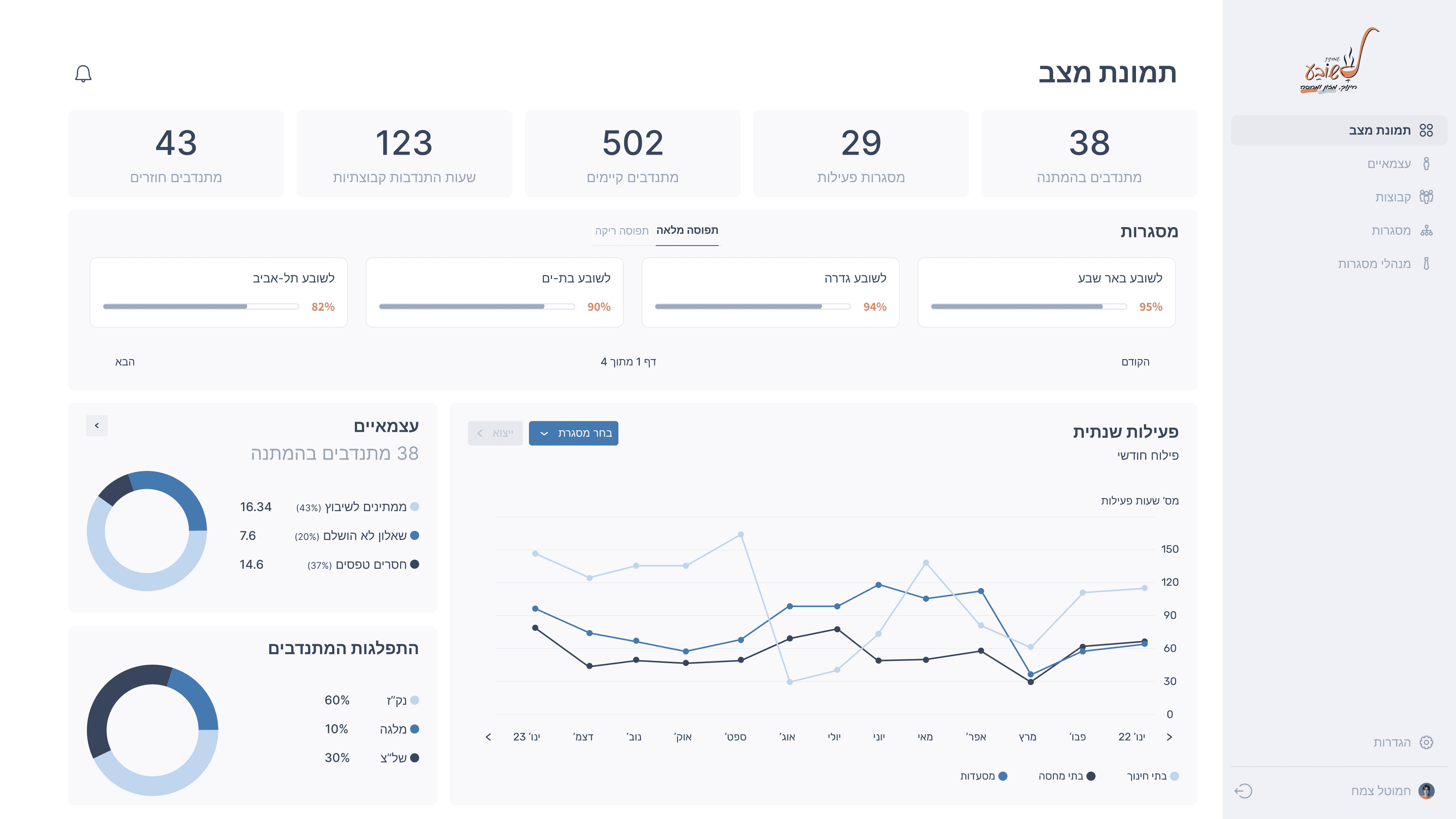
Home page - Dashboard
Simple menu for easy navigation throughout the system, The menu is placed on the right side for easy access
Individual page
We used spacing between rows in the table to reduce cognitive overload
The goal of the icons is to indicate the operation required in the system
Individuals Page-Volunteer Card pop up
The activity tracking table allows the manager to manage reported hours by volunteers, including approving, editing, and adding hours, as well as viewing monthly and yearly hours in an archive.
Documents required to complete the volunteer card. These details are important because they are delivered to a third party.

Notification center
The notification center is intended to update changes made by others and related to the manager's activity.

Mobile
We build a interface for the volunteer so they can enter the shift easily and quickly without a 3rd party factor


To the top